

The 3 Best Kokoro TTS Apps for iPhone in 2026: On-Device Voices Compared
Updated: Local TTS18 min
Table of contents
- What Kokoro-82M is, in one paragraph
- What to look for in a Kokoro TTS app
- The three options at a glance
- 1. Local TTS - Voice Aloud Reader — best for reading documents and printed pages aloud
- 2. On-Device AI: Private Suite — best for a whole local AI toolkit
- 3. Koro Voices — cheapest way to tinker with offline voices
- Also worth knowing
- Background playback: what happens when you lock the screen
- How to choose
- Frequently asked questions
- Verdict: pick the wrapper, not the model
Kokoro-82M is the reason a lot of people first hear genuinely natural synthetic speech running on their own hardware. It is small, it is open-weight, and it sounds far better than its 82 million parameters suggest — which is why it spread through local AI setups faster than almost any other text-to-speech model. The catch is that most of those setups involve Python, a terminal, and a laptop. On an iPhone, you need an app that has already done that work.
Short answer: Local TTS is the best choice if you want Kokoro voices inside a real reading app for PDFs, e-books, and pages you photograph. On-Device AI suits people who also want local chat models and speech recognition in the same place. Koro Voices is the cheapest way to tinker with offline voices, if English or Italian is all you need.
Scope and sources: This roundup covers Local TTS - Voice Aloud Reader, On-Device AI: Private Suite, and Koro Voices: Text to speech. Local TTS is our own app, so the selection criteria are stated before the rankings, and the other apps are described only from their own App Store listings, checked on August 13, 2026. Model facts come from the official Kokoro-82M model card and its VOICES.md. Features and prices change — confirm the current listings before paying.
What Kokoro-82M is, in one paragraph
Kokoro-82M is an open-weight neural text-to-speech model published by hexgrad. Version 1.0 arrived on January 27, 2025, outputs 24 kHz speech, and ships under an Apache 2.0 license for the weights. Its official voice catalog publishes 20 American English and 8 British English voices, including af_heart — the “Heart” voice the catalog grades highest. At roughly 82 million parameters it fits comfortably on a modern iPhone, which is exactly why it turns up in on-device apps instead of behind a cloud API. Our Kokoro-82M guide covers the architecture and its limits in more detail.
What to look for in a Kokoro TTS app
A small model is the easy part. What differs between these apps is everything wrapped around it, and that is what you actually live with:
- Whether the model is named at all. Plenty of offline readers use Kokoro or something like it without saying so. If the model matters to you, check that the listing names it — and check that speech is generated locally rather than fetched from a server that happens to run Kokoro.
- Which voices you get, and how they arrive. Some apps bundle the English catalog; others download a voice pack after install. That changes both the app size and what works on day one.
- What you can feed it. A voice model is not a reader. To listen to a 200-page PDF, an EPUB, or a Word file, the app has to import and extract the text first.
- Whether it can read images. Half of what people want read aloud is not a file at all: a textbook page, a printed handout, a screenshot, a photographed contract. That needs on-device OCR built into the app, not a separate scanning step.
- What happens while you listen. Word-by-word highlighting, background and Lock Screen playback, a saved position per document, and audio export are the difference between a demo and a daily habit.
- Device requirements and download size. On-device models mean recent hardware and large downloads — anywhere from about 100 MB to nearly two gigabytes.
- How you pay. Kokoro’s weights are open, but apps are not. Compare one-time purchases against subscriptions against free.
The three options at a glance
| Category | Local TTS | On-Device AI: Private Suite | Koro Voices |
|---|---|---|---|
| Best for | Reading documents, books, and printed pages aloud | Running local LLMs, STT, and TTS together | Cheap, unlimited offline voice tinkering |
| Kokoro named | Yes — 28 American and British English voices | Yes — Kokoro listed among its TTS engines | No — the listing does not name its model |
| Other engines | Supertonic 3 for 31 languages | Apple voices, PocketTTS, Qwen 3 TTS, and others | Voice blending from its built-in voices |
| Speech languages | 31 languages, plus 28 US/UK English voices | Not specified per engine in the listing | English (American and British) and Italian |
| Documents | PDF, EPUB, DOCX, TXT, Markdown, pasted text | PDF, Markdown, text, web articles, scanned books | PDF and text files |
| Reads images | Yes — on-device camera and photo OCR, free plan | Yes — scanned books with correctable OCR | Not listed |
| While listening | Word highlighting, per-note voice, M4A export | Reading and listening queue, RSS | Audio file export and sharing |
| Screen locked | Neural voices keep playing, with Lock Screen and Control Center controls | Listening queue with resume; background playback not described | Not described in the listing |
| Download size | About 630 MB | About 1.9 GB | About 113 MB |
| Requires | iOS/iPadOS 18.6+, iPhone 12 or later | iOS 18.0+, A12 Bionic or later | iOS 16.6+, iPhone XS or later |
| Price (US) | Free plan; Pro $4.99/mo or $19.99 lifetime | Free with in-app purchases from $3.99 | Free with a $1.99 lifetime unlock |
The table records published capabilities and US prices, not voice-quality rankings. How a given sentence sounds depends far more on the voice you pick and the punctuation in your text than on the app around it.
1. Local TTS - Voice Aloud Reader — best for reading documents and printed pages aloud
Local TTS is built around the assumption that you want to finish something: a report, a chapter, a paper, a stack of printed handouts. Kokoro-82M powers its 28 American and British English voices, and the whole pipeline — text extraction, language detection, camera OCR, and speech generation — runs on the iPhone or iPad. Nothing is uploaded to a speech server, there is no account, and Apple’s App Privacy label for the app is Data Not Collected.
Because generation is local, new audio works in Airplane Mode rather than only replaying files converted earlier, and there are no per-word cloud allowances to burn through when you replay or re-export a long document.
It reads what you photograph, not just what you download. Point the camera at a textbook page, a printed contract, a leaflet, or a page from a library book, and on-device OCR extracts the text and hands it to the same voices — no upload, no scanning app in between, and it is included in the free plan rather than reserved for a subscription tier. That covers the material that never exists as a file in the first place, which is where most readers hit a wall.
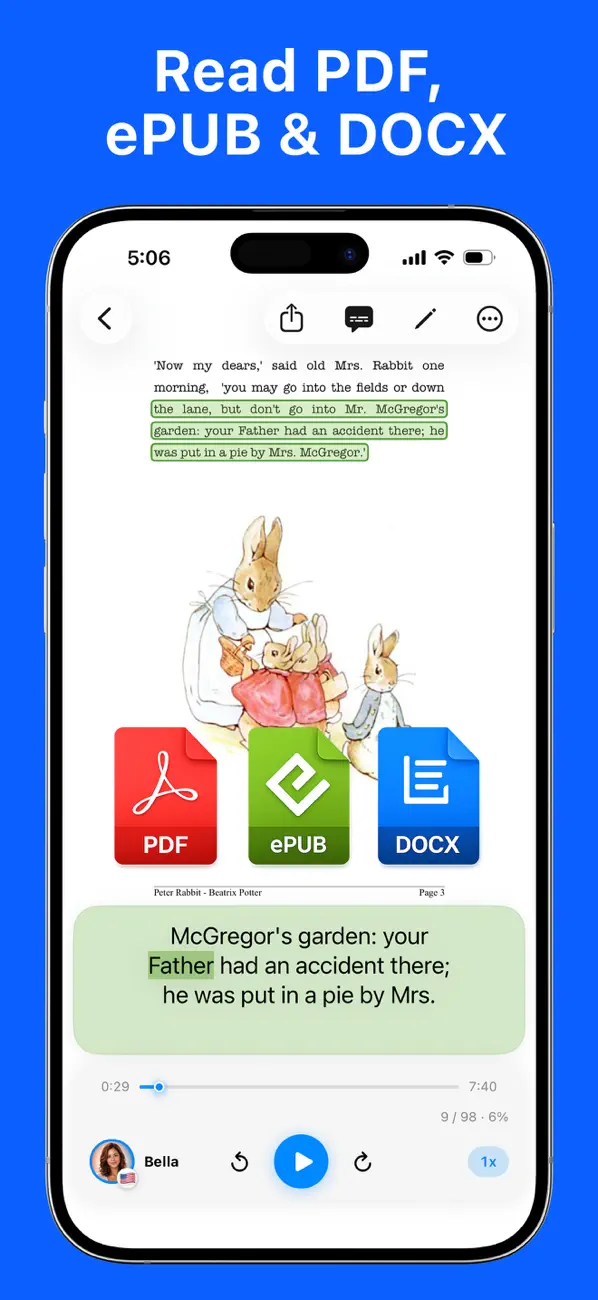
The other differences show up over a long listen rather than in a demo sentence: words highlight in sync so you can read along or find your place after looking away, playback continues from the Lock Screen and Control Center with the screen off, each note keeps its own voice and speed, tags keep a library organized, notes sync through your own private iCloud, and Pro exports any note as an M4A file you can keep or play in a podcast app.
Key facts:
- Voices: all 28 Kokoro-82M English voices, plus a multilingual voice powered by Supertonic 3 that reads 31 languages offline — the widest language coverage on this list by a distance.
- Documents: PDF, EPUB, DOCX, TXT, Markdown, and pasted text — see how to read a PDF aloud offline.
- Images: camera and photo OCR on the device, so a photographed page becomes a listenable note.
- While listening: word-by-word highlighting, background and Lock Screen playback, a different voice per note, tags, and optional private iCloud sync across iPhone and iPad.
- Free plan: 500 characters per note with one multilingual and three English voices, plus file import and camera OCR.
- Pro: $4.99 monthly or a $19.99 one-time lifetime purchase for unlimited text, the full voice catalog, full multi-page PDF import, and M4A export.
- Requirements: iOS/iPadOS 18.6 or later on iPhone 12 or later, or a supported recent iPad. About 630 MB.
The honest limits: the app needs relatively recent hardware because the models run locally, the download is large for the same reason, there is no Android, Windows, or web version, and the free plan’s 500-character cap means a full chapter needs Pro. If you want to experiment with voices rather than read documents, the two apps below ask less of your storage.
Download Local TTS free from the App Store and hear the Kokoro English voices on a document you actually need to get through.
2. On-Device AI: Private Suite — best for a whole local AI toolkit
On-Device AI, from developer Zijie Deng, is the maximalist option: a single app for running local language models and speech together. Its listing describes support for local models including Llama, Gemma, Phi, Qwen, DeepSeek, Mistral, and Nemotron, and says you can “create audio with Apple voices, Kokoro, PocketTTS, Qwen 3 TTS, CosyVoice, and VibeVoice.” A recent update introduced the Kokoro TTS model specifically, promising more expressive speech with stable memory handling.
It also reads: the listing covers importing “PDFs, Markdown, plain text, readable web articles, and scanned books,” correcting on-device OCR, and turning documents and articles into “a reading and listening queue,” with RSS support.
Key facts:
- Kokoro: offered as one text-to-speech engine among several, alongside Apple voices and other local models.
- Beyond TTS: a full roster of local chat models plus speech-to-text in the same app — the broadest local-AI scope on this list.
- Documents and images: PDF, Markdown, text, web articles, and scanned books, with on-device OCR you can correct before listening.
- Price: free with in-app purchases listed as Pro Member Subscription at $3.99 and $34.99, and Lifetime Pro Member at $49.99 and $99.99.
- Requirements: iOS 18.0 or later with an A12 Bionic chip or later, and roughly 1.9 GB to download. It also lists Mac and Apple Vision Pro compatibility.
Where it wins outright: if you want offline chat models, dictation, and Kokoro speech without installing three separate apps, it goes further than anything else here. The trade-off is scope — a general AI toolkit spreads its interface across many features, so the reading and listening flow is one capability among dozens rather than the entire product.
3. Koro Voices — cheapest way to tinker with offline voices
Koro Voices, from developer Emanuele Delirio, is the smallest and cheapest app here at about 113 MB and a single $1.99 unlock. Its listing describes “a voice aloud reader, completely offline on your device. No internet required, no limits, no subscriptions,” and states that “everything happens right on your device. No cloud services, no data usage… your text never leaves your phone.”
One clarification before you compare it to the other two: its App Store listing never names Kokoro or Kokoro-82M. The app’s name and its speech languages — American and British English plus Italian, all of which Kokoro v1.0 publishes voices for — point in that direction, but the developer does not state a model, so treat the connection as unconfirmed and judge the app on what it actually promises.
What it does promise is unusual for the price. Beyond unlimited synthesis, the listing describes blending built-in voices “to create your own unique sound” and adjusting pronunciation “at phoneme level for a perfect speech” — the kind of control most reading apps never expose. It also bundles Whisper transcription in 10+ languages, extraction of speech from audio and video files, and summarizing or rewriting long text with a local language model.
Key facts:
- Voices: built-in offline voices with blending and phoneme-level pronunciation editing. Speech in American English, British English, and Italian only.
- Documents: text files and PDFs. No EPUB or DOCX, and image scanning is not listed.
- Extras: live Whisper transcription in 10+ languages, transcription from audio and video files, and local-model summarization.
- Export: save speech as audio files and share them.
- Price: free to try, with a single $1.99 “Koro Unlimited” lifetime purchase; the listing notes some features are limited in the free version.
- Requirements: iOS 16.6 or later, iPhone XS or later — the most forgiving hardware requirement here. Version 2.0.1 shipped March 25, 2026.
Where it wins: if you want an offline voice you can tune, on an older iPhone, for the price of a coffee, nothing else on this list competes. The trade-offs are language coverage, the missing model disclosure, and the fact that its own listing warns that “the speed and general performances of Koro change depending on your device model.”
Also worth knowing
Simple Voice Reader from Walter Claw Software LLC is the free minimalist option and names its model outright: a 3 MB app that “reads pasted or typed text, TXT files, RTF files, and PDFs aloud,” where “on compatible iOS 26 devices, you can also download an optional American English Kokoro voice pack with Heart and 19 other natural voices. The pack is about 170 MB, downloads once from Apple, and can be removed at any time.” It is free with no in-app purchases and highlights words as it reads. Read the requirement line carefully, though — the app runs on iOS 17, but the Kokoro pack is gated to compatible iOS 26 devices, and on anything older you get Apple’s system voices instead. There is no e-book support, no OCR, and no audio export.
PageEcho - AI Text Reader is an on-device e-book reader whose listing says its speech is “powered by Supertonic, Kokoro and Apple system voices.” It is not a general reading app — it wants EPUB, MOBI, AZW3, FB2, and PDF books — and it requires iOS 26 or later, so it is out of reach on older iPhones. We cover it in the roundup of apps using Supertonic.
Developers do not need an app at all. Open-source Swift packages such as mlalma/kokoro-ios (MIT-licensed, MLX Swift, iOS 18+) generate English audio faster than real time on recent iPhones and can be dropped into your own project. That is a build-it-yourself route, not something you install from the App Store.
Background playback: what happens when you lock the screen
This is the detail most roundups skip, and it separates these apps more sharply than voice quality does. Neural speech is generated continuously as you listen, and iOS restricts how much work an app may do once it leaves the foreground. So “it reads aloud” and “it keeps reading aloud with the screen off” are two different claims.
Local TTS states background playback plainly: “Background playback with lock screen and Control Center controls.” Its neural voices continue rather than handing off to a different voice, because the app prepares upcoming speech through an optimized Core ML path built for background work — the same path used for audio export. In practice you press Play, put the phone in your pocket, and skip or pause from the Lock Screen while the same Kokoro or Supertonic 3 voice keeps going.
Simple Voice Reader is unusually candid about the alternative, and worth quoting because it shows the constraint at work: “Apple speech continues when the app moves to the background or the screen locks, with pause, resume, and stop controls on the Lock Screen and in Control Center. If Kokoro cannot continue because the device needs more memory or the app moves to the background, reading continues with the selected Apple voice.” That is a reasonable design for a 3 MB app — but it means the Kokoro voice you chose is not necessarily the voice you finish the chapter with.
On-Device AI describes a listening queue you can “take with you” and the ability to “resume listening, play what is next,” but its listing does not specifically describe playback continuing while the app is in the background. Koro Voices does not mention background or Lock Screen playback at all; its answer to listening away from the app is exporting an audio file you can “listen back anytime, even without the app,” which works well for a commute but is a separate step rather than continuous playback.
If listening with the screen off is the whole point — walking, driving, cooking, falling asleep to a chapter — test it before you buy: start a long text, lock the phone for several minutes, and check whether audio continues and whether the voice is still the one you picked.
How to choose
- You want to listen to documents, books, and pages you photograph: choose Local TTS. Kokoro voices sit inside an import-scan-and-listen workflow with OCR, highlighting, Lock Screen playback, and M4A export.
- You listen with the screen off, on a walk or a commute: choose Local TTS, or export an audio file from Koro Voices and play it in a podcast app.
- You want local LLMs, dictation, and TTS in one app: choose On-Device AI, and expect a larger download and a broader interface.
- You want the cheapest offline voice, or you have an older iPhone: choose Koro Voices — $1.99, about 113 MB, and it runs back to iPhone XS on iOS 16.6.
- You want to hear Kokoro specifically, for free: try Simple Voice Reader, provided your device supports its iOS 26 voice pack.
- You need languages other than English: Kokoro alone will not get you there. Local TTS pairs it with Supertonic 3 for 31 languages; for a wider view of non-Kokoro options, see our roundup of the best text-to-speech apps for iPhone.
Whichever you pick, test it on your own material before committing. Paste a page containing names, numbers, and technical terms, and check pronunciation, how long the first sentence takes to start, and whether playback survives locking the screen. If you plan to listen to printed material, photograph one real page and see what the app does with it. A list ranks apps; your own page tells you whether the result is worth listening to for an hour.
Frequently asked questions
Is there an official Kokoro TTS app for iPhone?
No. Kokoro-82M is an open-weight model published by hexgrad on Hugging Face, not an app. To use it on an iPhone you install a third-party app that bundles the model, such as Local TTS or On-Device AI.
Do Kokoro TTS apps work without an internet connection?
Yes, once the model is on the device. At roughly 82 million parameters Kokoro is small enough to run on an iPhone, so apps that bundle or download it generate new speech offline. Some still need a connection for the initial voice-pack download or for unrelated cloud features.
Can a Kokoro TTS app read a photographed page aloud?
Only if the app includes OCR. Local TTS recognizes text from the camera or a saved photo on the device and reads it with the same voices, included in the free plan, and On-Device AI lists scanned-book import with correctable on-device OCR. Koro Voices lists text and PDF import but no image scanning.
Do Kokoro voices keep playing when the iPhone screen is locked?
That depends on the app, not on the model. Local TTS lists background playback with Lock Screen and Control Center controls, and keeps generating its neural voices in the background. Simple Voice Reader states that if Kokoro cannot continue in the background, reading continues with the selected Apple voice instead. On-Device AI and Koro Voices do not describe background playback in their listings.
Which Kokoro-style TTS app for iPhone is cheapest?
Koro Voices unlocks its full app with a single $1.99 purchase. Local TTS is free to download and reads up to 500 characters per note, including three Kokoro English voices, with Pro at $4.99 monthly or $19.99 lifetime for unlimited text, every voice, and M4A export. On-Device AI is free with paid tiers listed from $3.99.
Does Kokoro-82M support languages other than English?
The public Kokoro v1.0 release includes voices in several languages, but its own voice notes warn that non-English support can be thin because pronunciation tooling and training data vary by language. Local TTS therefore uses Kokoro for its 28 American and British English voices and Supertonic 3 for all 31 supported languages.
How many Kokoro voices does an iPhone app usually include?
Kokoro v1.0 publishes 20 American English and 8 British English voices. Local TTS includes all 28 in its full catalog, alongside a multilingual Supertonic 3 voice that reads 31 languages offline.
Verdict: pick the wrapper, not the model
Everything here runs neural speech locally, so the decision is not really about Kokoro. It is about what the app does with it. If offline voices are a curiosity, $1.99 and 113 MB buys a surprising amount of tinkering. If they are part of a broader local-AI habit, the private suite consolidates everything into one large app. And if what you actually want is to get through the reading you have been postponing — the PDFs, the e-books, the printed pages sitting on your desk — pick the app built around documents and a camera.
Download Local TTS free from the App Store and put a real PDF or a photographed page through it — Kokoro English voices, on-device, with no account, upload, or word quota involved.

Turn any text into speech — offline
Local TTS reads PDFs, e-books, and articles aloud right on your iPhone — private, natural, and yours.
Download on the App Store