

Table of contents
What if the same natural voice could read an English article, a Korean note, a Japanese handout, and a Spanish e-book—without downloading a language pack or sending a sentence to the cloud?
That is what Supertonic 3 does inside Local TTS. It is the multilingual speech engine behind the app’s 31-language voice, running directly on your iPhone or iPad. Paste text, import a document, or scan a printed page; Local TTS detects the language and generates the audio on your device.
There is no model installation, command line, account, or API key. One multilingual voice is included in the free version, so you can try all 31 languages with your own text.
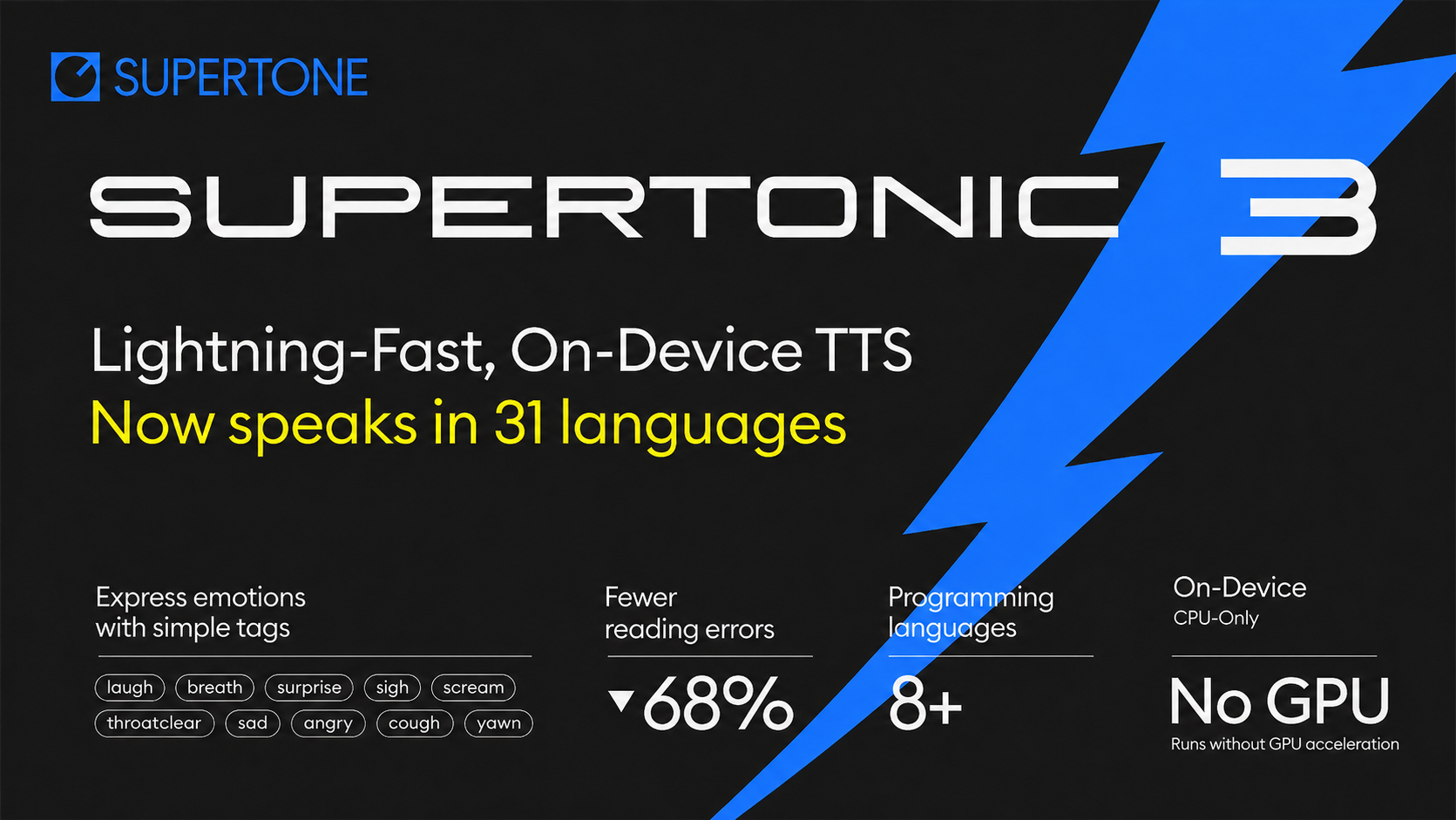
Official image: The article cover is Supertone’s unchanged Supertonic 3 hero image from the official model repository. Its performance statements are Supertone’s upstream release claims.

The one-sentence answer
Supertonic 3 is a compact, roughly 99-million-parameter text-to-speech model that generates 44.1 kHz speech in 31 languages through ONNX Runtime, making private multilingual reading practical on a phone.
The important word is not just “multilingual.” It is on-device. Supertonic 3 does not need to upload each paragraph to a speech server. Once Local TTS is installed, the model, voice styles, language handling, and audio generation are available offline.
What is Supertonic 3?
Supertonic 3 is an open-weight, multilingual text-to-speech model from Supertone. The official Supertonic repository describes it as a lightweight system designed for local inference through ONNX Runtime, without a cloud call or GPU requirement.
The project announced Supertonic 3 on April 29, 2026. Compared with Supertonic 2, Supertone says version 3 expands language coverage from 5 to 31 languages, reduces repeated or skipped words, and improves voice consistency across the languages shared by both versions.
| Supertonic 3 in Local TTS | |
|---|---|
| Model size | About 99 million parameters |
| Supported languages | 31 |
| Audio output | 44.1 kHz |
| Runtime | ONNX Runtime on CPU |
| Local TTS voice styles | 10 presets: F1–F5 and M1–M5 |
| Free version | One multilingual style that reads all 31 |
| Network needed for speech | No |
| Model weights license | OpenRAIL-M |
Its public ONNX assets separate the job into a text encoder, duration predictor, vector estimator, and vocoder. You never need to manage those files in Local TTS: they are packaged and coordinated by the app.
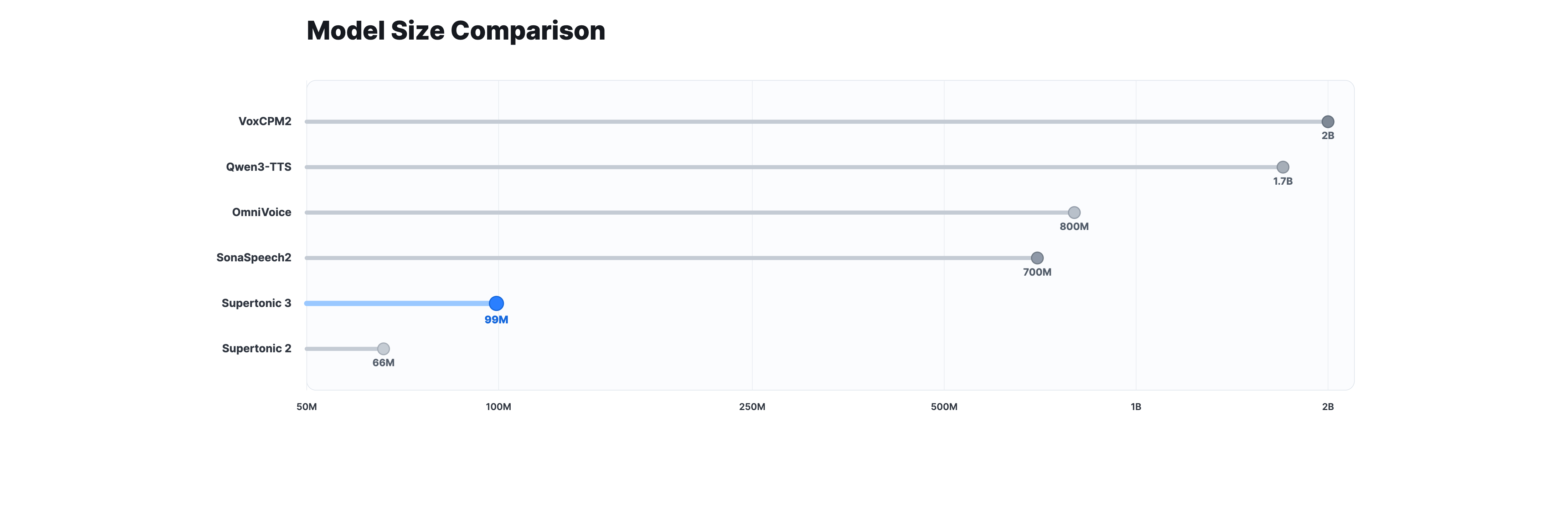
Source: Supertone’s official model-size comparison. The chart is reproduced unchanged; model names and parameter counts are the publisher’s comparison.

Which 31 languages does Local TTS support?
The Supertonic 3 voice in Local TTS reads the complete 31-language set published in the official model card:
| Arabic | Bulgarian | Croatian | Czech |
| Danish | Dutch | English | Estonian |
| Finnish | French | German | Greek |
| Hindi | Hungarian | Indonesian | Italian |
| Japanese | Korean | Latvian | Lithuanian |
| Polish | Portuguese | Romanian | Russian |
| Slovak | Slovenian | Spanish | Swedish |
| Turkish | Ukrainian | Vietnamese |
Chinese is not currently part of Supertonic 3’s official 31-language list. Local TTS does not label an unsupported language as supported simply because a model may produce sound for it.
The broad language set matters beyond translation. A single reading list may contain an English paper, a Korean memo, a French PDF, and a Japanese EPUB. You can keep them in one app and use the same familiar voice style instead of choosing a different speech provider for each language.
Why Local TTS uses Supertonic 3
Supertonic 3 provides the multilingual audio engine. Local TTS turns it into a reader designed for documents, study material, and everyday listening.
1. One voice style can cross language boundaries
Local TTS includes ten Supertonic 3 preset styles: five feminine and five masculine options. Each style can read all 31 supported languages, so a voice does not have to change just because the document does.
The app also detects language from the text. When a document switches languages between sentences, Local TTS separates the speech at sensible boundaries and sends each section with the appropriate language. The voice character remains consistent while the pronunciation system changes.
Short names and isolated borrowed words can be ambiguous in any automatic detector. Longer sentences provide stronger language signals, and Local TTS keeps uncertain fragments with the surrounding language to avoid unnecessary switching.
2. CPU inference keeps speech available in the background
Supertonic 3 runs through ONNX Runtime on the CPU in Local TTS. It does not require a remote GPU—or even the iPhone GPU—to synthesize speech.
That choice lets the app continue preparing audio during background playback. Lock the screen, switch to another app, or use Lock Screen controls; the current document can keep reading without a cloud fallback.
3. Your documents stay on your device
An online TTS service must receive text before it can speak it. Local TTS takes a different path: PDF text, e-book chapters, pasted notes, OCR results, and generated audio are processed on your iPhone or iPad.
This is useful for personal notes, school material, unpublished writing, and internal documents. There is no Local TTS account, no advertising, and no tracking. Optional iCloud sync uses your own iCloud account; the AI operation that turns text into speech remains local.
4. It is ready for reading, not just model testing
The public Supertonic project offers code for developers. Local TTS packages the model into a reader that anyone can use:
- Paste text or write a note.
- Import PDF, EPUB, Word, TXT, and Markdown files.
- Capture a printed page with on-device OCR.
- Follow the current sentence as speech plays.
- Choose a voice and speed for each note.
- Listen from the Lock Screen and Control Center.
- Export the complete reading as an M4A file with Pro.
Download Local TTS free on the App Store and try the Supertonic 3 voice in any of its 31 languages.
Supertonic 3 and Kokoro-82M have different jobs
Local TTS combines two on-device voice families rather than asking one model to do everything.
| Supertonic 3 | Kokoro-82M | |
|---|---|---|
| Role in Local TTS | Multilingual reading | Premium American and British English |
| Language coverage | 31 languages | English in Local TTS |
| Voice choices | 10 styles, each multilingual | 28 English voices |
| Output rate | 44.1 kHz | 24 kHz |
| Best reason to use | One consistent voice across different texts | A broad selection of English personalities |
If most of your material is multilingual, Supertonic 3 is the natural starting point. If you primarily listen in English and want a larger selection of American and British voices, choose Kokoro. You can switch per note at any time.
Read our Kokoro-82M guide for a closer look at the English voice engine.
What affects multilingual reading quality?
Thirty-one-language support does not mean every input is unambiguous. These details have the greatest effect:
- Enough text for language detection: A complete sentence is easier to identify than a single name.
- Clear punctuation: Periods, commas, and paragraph breaks tell the model where to pause.
- One main language per sentence: Rapid word-by-word language switching is harder than separate multilingual sentences.
- Names, abbreviations, and numbers: These may follow different reading conventions in different countries.
- Source quality: OCR errors from a blurred photo become pronunciation errors when read aloud.
For a mixed-language document, keep each language in a complete phrase or sentence where possible. Before exporting important audio, preview names and specialist vocabulary in the intended voice.
Limits and responsible use
Supertonic 3 is designed for efficient local TTS, but it is not perfect. Pronunciation and rhythm vary by language, text type, and voice style. Automatic language detection may misclassify a very short or ambiguous fragment. Chinese is not in the supported language set.
The model also does not provide exact word-level timing to Local TTS. With Supertonic voices, the reader follows the current sentence during playback rather than claiming a precise timestamp for every word.
Supertonic 3’s model weights use the OpenRAIL-M license. Local TTS includes the license terms and a disclosure before AI-generated audio export. Do not use synthetic speech to impersonate someone, deceive listeners, harass people, or create unlawful content. When you share generated audio, clearly identify it as AI-generated speech.
Frequently asked questions
Does Local TTS really use Supertonic 3?
Yes. Supertonic 3 is the on-device engine behind Local TTS’s multilingual voice and its 31 supported languages.
Do I need to download a separate model for each language?
No. The same bundled Supertonic 3 model and voice style handle all 31 languages. There are no separate language packs.
Can one document contain several languages?
Yes. Local TTS detects the language of each text section and can read a document that changes languages between sentences while keeping the selected voice style.
How many Supertonic voices are available?
Local TTS includes ten preset styles, F1 through F5 and M1 through M5. The free version includes one multilingual style; Pro unlocks the complete catalog.
Does it work offline?
Yes. The model is bundled with Local TTS, and speech generation runs on the device without a network connection.
Does Local TTS support Chinese?
Not currently. Chinese is not one of Supertonic 3’s official 31 supported languages.
Can Local TTS clone my voice?
No. Local TTS uses preset Supertonic 3 voice styles and does not include custom voice cloning.
Hear all 31 languages on your own device
Supertonic 3 makes a broad multilingual voice practical without a speech server. Local TTS adds the parts that turn that model into a daily reader: document import, OCR, language detection, sentence tracking, background playback, voice controls, and audio export.
Start with the free multilingual voice. Paste a sentence in Korean, Japanese, Spanish, German—or any of the 31 supported languages—and tap Play. Your text stays on your iPhone or iPad throughout the process.
Download Local TTS free on the App Store and turn your first multilingual document into private, offline speech with Supertonic 3.
Turn any text into speech — offline
Local TTS reads PDFs, e-books, and articles aloud right on your iPhone — private, natural, and yours.
Download on the App Store