

Local TTS - Voice Aloud Reader vs NaturalReader - Text To Speech: Offline, Pricing, and Privacy
Local TTS12 min
Table of contents
- Local TTS vs NaturalReader at a glance
- Six reasons Local TTS may be the better fit
- Where NaturalReader is stronger
- How the privacy models differ
- Pricing comparison
- Comparing the free plans
- Voices and languages
- Documents and OCR
- Audio export and permitted use
- Choose Local TTS if you…
- Choose NaturalReader if you…
- Frequently asked questions
- Verdict: Local TTS for private listening on Apple devices
Local TTS - Voice Aloud Reader and NaturalReader - Text To Speech are mobile apps that read documents and text aloud. Both can handle PDFs and ebooks, scan printed pages with a camera, and highlight text during playback. The major differences are where speech is generated and how paid usage is priced. For readability, this article uses Local TTS and NaturalReader after this first mention.
Local TTS is the simpler, more economical option if you use an iPhone or iPad, do not want to send documents to a speech server, or prefer listening without monthly voice quotas. NaturalReader is stronger if you also use Android and want a much larger cloud voice catalog plus more reading and study tools.
Scope and image sources: This article compares Local TTS with NaturalReader - Text To Speech for iOS and Android, not the separate NaturalReader AI Voice Generator for commercial production. The cover combines the official App Store icons of both apps, and the in-article screenshot comes from NaturalReader’s official mobile page. Features and prices were checked against official public information on August 7, 2026.
Local TTS vs NaturalReader at a glance
| Category | Local TTS - Voice Aloud Reader | NaturalReader - Text To Speech |
|---|---|---|
| Devices | iPhone and iPad | iPhone, iPad, and Android |
| Speech processing | On the device | Primarily cloud conversion, with a mobile offline mode |
| Internet for new speech | Not required | Required for AI voice conversion |
| Languages | 31 | More than 90 on the official mobile page |
| Voice selection | 10 multilingual styles and 28 US/UK English voices | More than 200 AI voices, with plan-specific limits |
| Documents | PDF, EPUB, DOCX, TXT, Markdown | PDF, EPUB, Word, PowerPoint, and many more |
| Camera OCR | On-device and included in the free plan | Subscription feature |
| Reading aids | Highlighting, speed controls, background and lock-screen playback | Word and sentence highlighting, captions, annotations, dyslexia-friendly fonts |
| Free use | 500 characters per note, 1 multilingual and 3 English voices | Unlimited basic voices, daily limits for advanced voices, no OCR or MP3 |
| Paid price | $4.99 monthly or $19.99 lifetime | Lite starts at $13.90 monthly or $79 yearly |
| Paid usage | No text cap or cloud credits with Pro | Daily voice limits and monthly MP3 limits vary by tier |
| Audio export | M4A with Pro | MP3 with a subscription, licensed for personal use |
| Account | No separate account | Can be used without signing in; an account connects the library |
| Data flow | TTS and OCR stay on-device | Text is encrypted and sent to servers for conversion |
NaturalReader connects a broad cloud voice service across several platforms. Local TTS is designed to complete the reading workflow privately on Apple devices.
Six reasons Local TTS may be the better fit
1. Your reading never goes to a TTS server
Local TTS processes text preparation, language detection, OCR, and neural speech on your iPhone or iPad. PDF text, pasted notes, photographed pages, and generated audio are not uploaded to an external speech service.
That distinction matters for unpublished manuscripts, work documents, study materials, and personal notes. There is no server retention period to evaluate because the app does not upload text for speech generation in the first place.
2. It generates new speech without an internet connection
Offline in Local TTS does not mean merely playing an MP3 that was prepared earlier. In airplane mode, you can open a saved document or paste new text and let the device generate each upcoming sentence. Long-form listening continues on a flight, underground, or while roaming.
NaturalReader also advertises a mobile offline mode. Its data security documentation, however, says text is encrypted and sent to its servers for conversion. Listening to downloaded audio offline is different from generating new speech entirely on-device.
3. Pro has no daily or monthly voice credits
Local TTS Pro uses the device’s computing power. Replaying a long document, changing a voice, or exporting it again does not consume another cloud allowance.
NaturalReader applies daily listening limits or monthly MP3 character limits according to the Free, Lite, Plus, or Pro plan and the selected voice tier. If you regularly listen to books, papers, or long Korean, Japanese, or Chinese documents, Local TTS offers a more predictable model.
4. A lifetime plan fixes the long-term cost
Local TTS Pro costs $4.99 per month or $19.99 as a one-time lifetime purchase. NaturalReader’s entry-level Lite plan costs $13.90 per month or $79 per year. The Local TTS lifetime price is roughly one quarter of one year of NaturalReader Lite, with no renewal the following year.
Actual App Store prices and taxes can vary by region, but the difference between a one-time purchase and a recurring subscription remains important for a reader you expect to use for years.
5. Camera OCR is available on the free plan
The Local TTS free plan can photograph a printed book or document, extract the words with on-device OCR, and read them aloud. The image and recognized text do not need to go to an OCR server.
NaturalReader also has a camera scanner and can convert image-based PDFs, but its official feature and plan documentation lists OCR as a subscription feature. Local TTS lets you test both recognition and speech with your own printed material before paying.
6. Import, listening, and export stay in one native app
Import PDF, EPUB, Word, TXT, or Markdown, choose a voice, follow the playback position, and continue listening with the screen locked. Pro can save the same reading as an M4A file for Files, AirDrop, or another audio player.
There is no Local TTS account, advertising, or analytics tracking. If you want notes on multiple Apple devices, optional sync uses your private iCloud rather than a RichSoft account.
Where NaturalReader is stronger
NaturalReader is an established cross-platform reading service. Its official mobile app page advertises iOS and Android support, more than 200 AI voices, and more than 90 languages. That range is useful if you switch between an Android phone and an iPad or frequently explore different languages and accents.
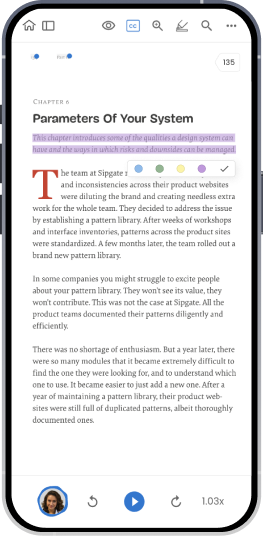
Source: NaturalReader’s official mobile app page. The original app screen is reproduced without modification.
NaturalReader’s mobile feature set also includes:
- PDF, ebook, Word, PowerPoint, and webpage reading
- Playback speed from 0.5× to 3×
- Word and sentence highlighting with enlarged captions
- Annotations, highlights, and saved reading positions
- Dyslexia-friendly fonts and reading modes
- A camera OCR scanner
- Subscription-based MP3 conversion and offline playback
- Personal voice cloning on Plus and Pro plans
A NaturalReader subscription includes its Personal web app and Chrome extension as well as the mobile app. The connected library is valuable if you routinely move between a phone, Android tablet, and desktop browser.
How the privacy models differ
Both apps advertise an ad-free, tracking-free experience, but speech conversion follows a different path.
Local TTS runs speech synthesis and OCR on the device. Notes and imported files remain in local storage by default. Optional sync uses the user’s private iCloud, and RichSoft does not operate a speech-conversion server or document library for the app.
NaturalReader sends text to its servers for cloud conversion. Its official data security article says transmissions are encrypted and conversion data is deleted afterward. For convenience, uploads from registered users may stay in an AWS S3 library for up to one year, while converted MP3 files may remain in the Audio Library for up to 30 days. Users can delete them sooner.
This does not mean NaturalReader ignores privacy. It means the choice is between encrypted cloud processing and on-device processing that does not send the text to a speech server. Local TTS provides the clearer architecture for confidential documents or policies that prohibit uploading source text.
Pricing comparison
The following prices were listed in NaturalReader’s official Personal pricing guide on August 7, 2026. They are US-dollar web prices; App Store, Google Play, taxes, and regional pricing can differ.
| App and plan | Monthly | Yearly or lifetime | Main differences |
|---|---|---|---|
| Local TTS Pro | $4.99 | $19.99 lifetime | Unlimited text, all voices, M4A export, full multi-page PDF import |
| NaturalReader Lite | $13.90 | $79/year | Lite voices, OCR, MP3, reading and AI tools |
| NaturalReader Plus | $20.90 | $119/year | Plus and cloned voices, higher usage allowances |
| NaturalReader Pro | $25.90 | $159/year | Pro LLM voices and Reading Styles |
NaturalReader’s paid plans bundle the web app and Chrome extension, which adds value if you use all three surfaces. If the goal is private document listening on an iPhone or iPad, Local TTS costs less per month and its lifetime option removes recurring payments.
Comparing the free plans
Local TTS Free includes one multilingual voice that reads all 31 supported languages, three US/UK English voices, and up to 500 characters per note. File import, on-device OCR, highlighting, and background playback are available to try without a subscription.
According to NaturalReader’s voice and usage guide, its free plan offers unlimited device or browser Free Voices, 20,000 characters per day with Lite Voices, and a shared 4,000-character daily allowance for Plus and cloned voices. OCR and MP3 conversion are not included.
Local TTS is a useful free test if you want to evaluate on-device quality and camera OCR with a short note. NaturalReader offers a larger free allowance when the priority is comparing longer passages across cloud voices.
Voices and languages
NaturalReader’s mobile page advertises more than 200 AI voices in more than 90 languages. Its catalog includes Gemini- and OpenAI-powered options alongside Lite, Plus, Pro, and cloned voices. Exact languages, voices, and usage allowances vary by plan and app version. NaturalReader has the broader catalog if variety is the primary requirement.
Local TTS prioritizes complete on-device operation. Ten multilingual styles powered by Supertonic 3 read 31 languages, while Kokoro-82M provides 28 US and UK English voices.
These voices do not depend on a network response, a server-side model change, or a daily quota. Once installed, the same voice remains available for a document without downloading a language pack or configuring an API key.
Documents and OCR
Both apps read PDF, EPUB, Word, and pasted text. NaturalReader supports additional formats such as PowerPoint, spreadsheets, and a broad range of image files, and it can add a webpage by URL. It supports more file types overall.
Local TTS focuses on PDF, EPUB, DOCX, TXT, and Markdown—the formats commonly used for long-form reading. Camera OCR stays on-device, and an imported document flows directly into native iOS background playback and lock-screen controls. It is a strong fit when private processing and a focused mobile workflow matter more than the total number of formats.
Neither app can directly import DRM-protected books from stores such as Kindle or Apple Books. Use a DRM-free EPUB or a document you are authorized to access.
Audio export and permitted use
Local TTS Pro exports on-device speech as M4A. Under the Local TTS Terms, notes and exported audio belong to the user. When sharing, publishing, or distributing audio, users must disclose that it is synthetic and comply with source copyright, model licenses, and platform rules.
MP3 conversion in NaturalReader requires a subscription. Lite voices include up to one million MP3 characters per month, while shared allowances apply to Plus and Pro voice tiers. NaturalReader Personal MP3s are licensed strictly for private listening; sending them to others or publishing them online requires its separate Commercial product.
Both apps work for saving audio you will listen to privately. Local TTS exports M4A, while NaturalReader exports MP3.
Choose Local TTS if you…
- Mainly listen to PDFs, ebooks, and work documents on an iPhone or iPad.
- Do not want text or OCR images sent to an external speech service.
- Need to generate new speech in airplane mode.
- Regularly listen to long documents without daily or monthly usage limits.
- Want to test camera OCR and on-device voices for free.
- Prefer $4.99 monthly or a predictable $19.99 lifetime purchase.
- Want to start without an account, ads, or analytics tracking.
- Need lock-screen playback and M4A export in one app.
Local TTS is optimized for iOS/iPadOS 18.6 or later on iPhone 12 or later, iPad 10th generation or later, iPad Air 4th generation or later, iPad mini 6th generation or later, and iPad Pro with M1 or later.
Choose NaturalReader if you…
- Also use an Android phone or tablet.
- Prioritize a catalog of more than 90 languages and 200 cloud voices.
- Read PowerPoint, spreadsheet, or other less common file formats.
- Need annotations, dyslexia-friendly fonts, or pronunciation editing.
- Want a web app and Chrome extension under the same subscription.
- Plan to use personal voice cloning or NaturalReader’s AI study tools.
Frequently asked questions
Is Local TTS an offline alternative to NaturalReader?
Yes. Local TTS supports PDF, EPUB, Word, TXT, Markdown, and camera OCR, and generates new speech directly on an iPhone or iPad. You can open a document and continue generating upcoming sentences without an internet connection.
Does NaturalReader also work offline?
NaturalReader provides a mobile offline mode and playback of downloaded MP3s. Its security documentation says that TTS conversion sends encrypted text to its servers. Local TTS performs the speech-generation step itself on-device.
Which app costs less?
Local TTS Pro costs $4.99 per month or $19.99 for lifetime access. NaturalReader’s entry-level Lite plan starts at $13.90 per month or $79 per year. Local TTS costs less for an iPhone or iPad document-reading workflow and offers a non-recurring option.
Does a long document cost more to read?
Local TTS Pro has no text-length cap or cloud voice credits. Replaying the same document or exporting it again as M4A does not consume a server-side character allowance.
Is OCR free?
Local TTS includes camera-based, on-device OCR on the free plan. NaturalReader lists OCR and Scan to Text as subscription features.
Which app is better for confidential documents?
Choose Local TTS if the source text must not be sent to a server. TTS and OCR run on-device, with no Local TTS account, ads, or analytics tracking. NaturalReader uses encrypted cloud conversion and an optional online library.
Does NaturalReader have more voices?
Yes. Its official mobile page advertises more than 200 voices and more than 90 languages. Local TTS offers 10 multilingual styles for 31 completely offline languages plus 28 US and UK English voices.
Can Local TTS save an audio file?
Yes. Pro exports a complete reading as M4A. The file is generated on-device, so there is no Local TTS server conversion or online retention period to wait for.
Verdict: Local TTS for private listening on Apple devices
NaturalReader is strong when you need Android support, a large cloud voice catalog, broad file compatibility, and additional reading aids. It is a good choice for people who want one connected library across many devices.
Local TTS takes a more private and focused approach. Your reading does not go to a speech server, new audio can be generated without internet access, and Pro reads long documents without daily or monthly cloud credits. Free OCR, a $4.99 monthly plan, and a $19.99 lifetime option make it a straightforward, economical reader for iPhone and iPad.
If you have already decided to switch, the on-device NaturalReader alternative covers what carries over, what you give up, and what you would pay instead.
Download Local TTS free from the App Store and try a real PDF or sentence in airplane mode. Your text and generated speech stay on your device.
Turn any text into speech — offline
Local TTS reads PDFs, e-books, and articles aloud right on your iPhone — private, natural, and yours.
Download on the App Store